Making Light Cones
Once a simulation has been formatted and any desired properties have been added, we can slice it into light cones, representing potential astrophysical fields to be observed. The utilities in the simim.lightcone module accomplish this, and are useful for creating mock observations and generating test data for reduction pipelines.
[3]:
import numpy as np
import matplotlib.pyplot as plt
from matplotlib import rcParams
pltsty = {
    'font.size' : 18,

    # Axis appearance
    'xtick.direction' : 'in',
    'ytick.direction' : 'in',
    'xtick.top' : True,
    'ytick.right' : True,

    # Legends
    'legend.frameon' : False,

    # Lines
    'lines.dashed_pattern' : [5,3],
}
rcParams.update(pltsty)
If you haven’t already done the following steps while following previous tutorials, the following code will download and format halo catalogs from the TNG100-3-Dark simulation and add SFRs and CII luminosities.
[TNG100-3-Dark is a simulation box with 100 Mpc sides, a dark matter particle mass of \(4\times10^8\) \(M_\odot\), and no Baryonic physics. We use this simulation because the total data volume is relatively small (~3 GB compared to ~1 TB for the full physics, full resolution TNG300-1 simulation). For most scientific applications it is advisable to utilize a higher resolution simulation. However the smaller, low-resolution TNG100-3 can be downloaded, formatted, and loaded much more quickly, making it useful for demonstration and testing purposes.]
[ ]:
import simim.siminterface as sim
from simim.galprops import prop_behroozi_sfr, prop_delooze_cii

api_key = '[fill in your API key here]' # Replace this with a string containing key
cat = sim.IllustrisCatalogs('TNG100-3-Dark',api_key)
cat.download_meta(redownload=False)
cat.download(redownload=False)
cat.format(remake=False)

rng = np.random.default_rng(58290)
tng100 = sim.SimHandler('TNG100-3-Dark')
tng100.make_property(prop_behroozi_sfr,other_kws={'rng':rng},write=True,overwrite=False)
rng = np.random.default_rng(85712)
tng100.make_property(prop_delooze_cii,other_kws={'rng':rng},rename='LCII',write=True,overwrite=False)
The first step to making a lightcone is to define its geometry - this entails an angle it subtends on the sky, a shape (box or circle are supported), and a redshift range covered. We will make a square lightcone of 1.0 degrees x 1.0 degrees covering redshifts 0 to 2.
This setup is handled by the simim.lightcone.LCMaker class:
[10]:
from simim.lightcone import LCMaker

gen = LCMaker(sim='TNG100-3-Dark',
              name="demo",
              openangle = 1.0,
              aspect = 1,
              mode = 'box',
              redshift_min = 0,
              redshift_max = 2,
              minimum_mass = 1e8)
A file for light cones of this name already exists.
Light cones already saved may be overwritten.
This code sets up a directory to save lightcones, and initializes all of the parameters necessary to build them, however no lightcones have been produced yet. To build lightcones we use the build_lightcones method. This will build lightcones with minimal information about the positions of objects included (angular position and redshift). We can then specify halo properties to include with the add_properties method.
[11]:
rng = np.random.default_rng(16398)
gen.build_lightcones(rng=rng)
gen.add_properties('sfr','LCII')
Generating lines of sight.
Creating files and adding metadata.
Collecting sources from Snapshot 33.
It is possible to build multiple lightcones, with the same redshift range, opening angle, and properties, but sampling the parent simulation volume differently (e.g. with different origins and viewing angles). This can be useful for exploring field to field variance:
[ ]:
n_lightcones = 10
rng = np.random.default_rng(16398)
gen.build_lightcones(n_lightcones, rng=rng)
gen.add_properties('sfr','LCII')
The LCMaker does not restrict lightcones to contain less volume than their parent simulations - arbitrary volumes can be filled by using multiple copies of the parent volume. However, to check that a given lightcone geometry will fit reasonably within a given simulation we can use the following code:
[3]:
from simim.lightcone import LCHandler
lc1 = LCHandler('TNG100-3-Dark','demo',0)
V = lc1.volume()

import simim.siminterface as sim
tng100 = sim.SimHandler('TNG100-3-Dark')
n = tng100.number_volumes(V)

print(f"The number of lightcones we can fit in the TNG100 volume is {n:.1f}")
The number of lightcones we can fit in the TNG100 volume is 11.2
Interacting with Lightcones
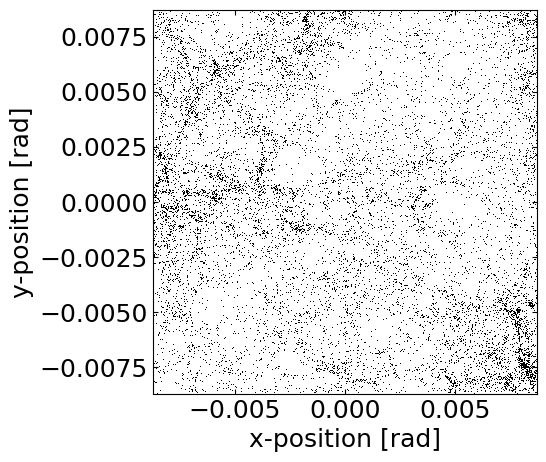
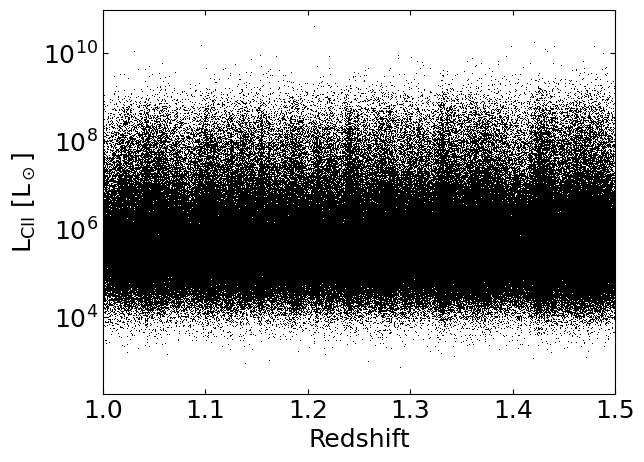
Once they are built, a separate handler object exists for visualizing and interacting with lightcones. The simim.lightcon.LCHandler class operates analogously to the SnapHanlder class for simulation snapshots. Many of the same methods used for exploring snapshots are useful here:
[20]:
from simim.lightcone import LCHandler

lc1 = LCHandler('TNG100-3-Dark','demo',0)

lc1.set_property_range('redshift',0.99,1.01)
lc1.plot('ra','dec',
         axkws={'xlabel':'x-position [rad]','ylabel':'y-position [rad]','aspect':'equal','xlim':(-0.5*np.pi/180,0.5*np.pi/180),'ylim':(-0.5*np.pi/180,0.5*np.pi/180)},
         plotkws={'marker':',','color':'k'})

lc1.set_property_range()
lc1.plot('redshift','LCII',
         axkws={'xlabel':'Redshift','ylabel':'L$_\mathregular{CII}$ [L$_\odot$]','xlim':(1.0,1.5),'yscale':'log'},
         plotkws={'marker':',','color':'k'})